Introduction
Research gets messy faster than most students expect. At first, every source feels memorable. A week later, the files have names like download(4).pdf, notes are split between a notebook and browser tabs, and you are not sure which source belongs in which paragraph.
Organizing sources is part of writing a stronger research paper. When your sources are organized, you can find evidence quickly, separate quotations from paraphrases, and avoid missing citation details.
This guide gives you a practical source-management system for essays, research papers, annotated bibliographies, and literature reviews. You can build it with folders, a spreadsheet, a citation manager, or a workspace tool. The method matters more than the software.
Key Takeaways
- Organize sources as soon as you find them, not at the end of the project.
- Use one consistent naming system for PDFs, notes, citation records, and drafts.
- Record citation details before reading deeply so useful evidence never becomes detached from its source.
- Connect each source to a section of the paper before drafting.
- Keep exact quotations, paraphrases, and your own comments clearly separated.
What Source Organization Means
Source organization means creating a clear system for storing, naming, tracking, reading, and using research materials. It includes PDF folders and citation records, but also the thinking work behind research: deciding why a source matters and where it fits.
A good source system answers five questions:
- Where is the source file?
- What citation details do I need?
- What is the source's main argument or purpose?
- Which evidence might I use?
- Which section of my paper does this source support?
If your system cannot answer those questions, it is incomplete. A folder full of PDFs is not organized research. You need a bridge between the source and the paper.
Why Source Organization Matters
Organized sources save time, but the bigger benefit is better thinking. When sources are tracked well, patterns become easier to see: agreement, disagreement, methods, limits, and gaps.
Organization also protects citation accuracy. Official style guidance such as APA emphasizes complete reference information, and university writing resources often remind students to distinguish between their own ideas and borrowed ideas. If you record source details early, you are less likely to lose the DOI, page number, publication date, or author name later.
Good organization also helps with academic integrity. When exact words are marked as quotations and paraphrases are labeled as rewritten source ideas, you reduce the risk of accidental plagiarism.
Common Problems Students Face
The most common source problem is delayed organization. Students collect sources first and plan to sort them later, often when the draft is already due.
Another problem is vague file naming. A PDF named article.pdf tells you nothing. A file named Nguyen-2022-online-learning-deadlines.pdf gives you author, year, and topic.
Students also mix note types. A copied sentence, a rough paraphrase, and a personal reaction might appear in the same note without labels. During drafting, it is no longer obvious what needs quotation marks, what needs citation, and what is your own analysis.
More sources do not automatically make a paper stronger. If you save fifteen articles but cannot explain where each one fits, you may have collected noise rather than evidence.
The Five-Part Source Organization System
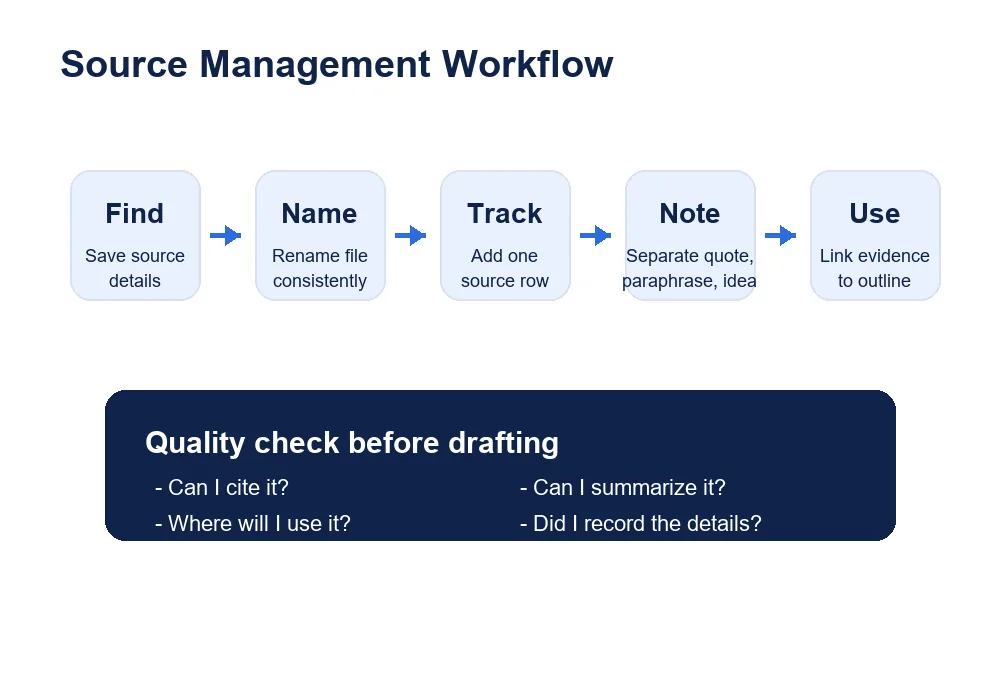
Use this five-part system for most academic projects:
- Create a research folder structure.
- Name files consistently.
- Build a source tracker.
- Take structured notes.
- Link evidence to sections of the paper.
The system is simple on purpose. You can use it for a short essay with five sources or a long literature review with forty sources. The structure expands as the project grows.
Step 1: Create a Research Folder Structure
Start with one project folder. Inside it, create subfolders for the parts of your research process. A simple structure might look like this:
Research Project
  01 Assignment Brief
  02 PDFs
  03 Notes
  04 Citation Records
  05 Draft Evidence
This keeps the assignment prompt separate from sources, notes, citation exports, and draft material. It also prevents the downloads-folder problem, where everything gets saved in one place with no context.
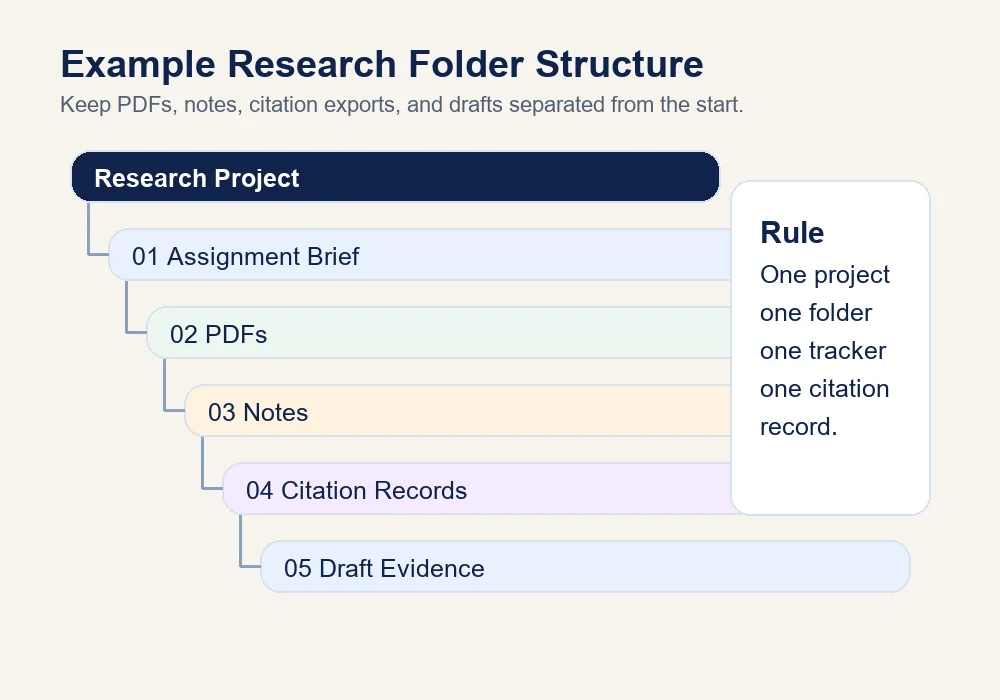
Whether you use cloud storage or local folders, the same logic applies. The folder names show the workflow, and the numbers keep them in order.
Step 2: Name Files Consistently
A file name should help future you understand what the source is. Use a predictable naming pattern:
Author-Year-Short-Topic.pdf
Poor file name:
download(7).pdf
Improved file name:
Martinez-2021-nursing-patient-education.pdf
If there are two authors, use the first author and "et-al" if needed:
Patel-et-al-2020-student-deadline-planning.pdf
For book chapters, add a chapter clue:
Roberts-2019-ch4-research-methods.pdf
For web sources saved as PDFs, include the organization:
APA-Style-2024-reference-examples.pdf
You do not need perfect file names. You need consistent file names.
Step 3: Build a Source Tracker
A source tracker is a spreadsheet or table where each row represents one source. It prevents the "Where did I read that?" problem because evidence, citation details, and paper section are stored together.
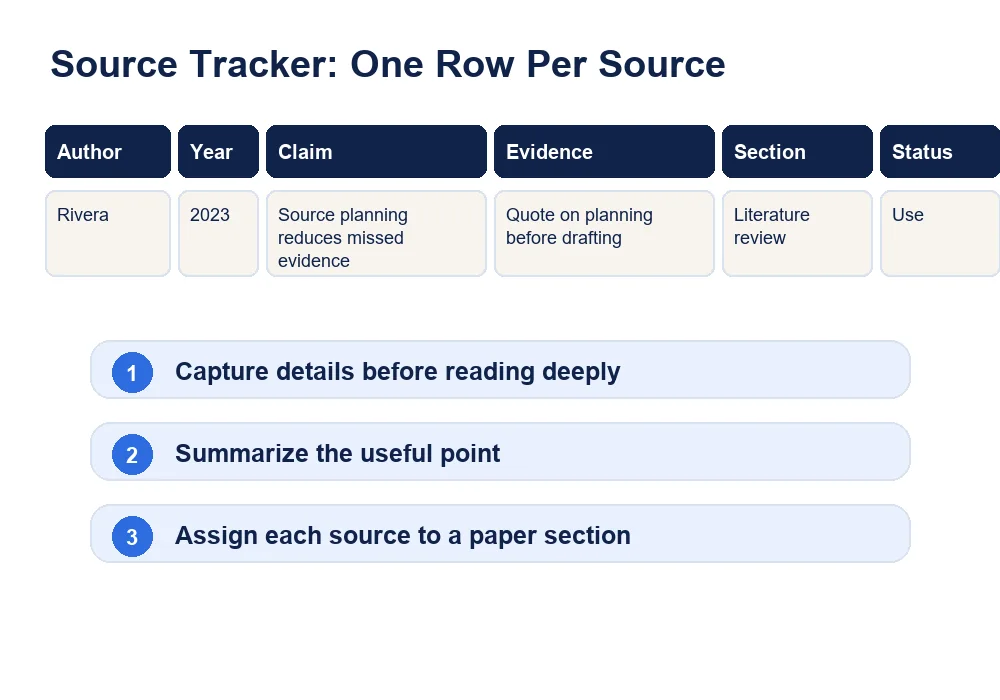
Use these columns:
| Author | Year | Title | Source type | Main argument | Useful evidence | Citation | Paper section | Status |
|---|---|---|---|---|---|---|---|---|
| Rivera | 2023 | Planning Sources Before Drafting | Journal article | Students lose evidence when notes are not tied to sections. | Explains why source-to-outline mapping improves drafting. | Rivera (2023) | Literature review | Use |
The "status" column matters. Mark each source as Use, Maybe, Skip, Cited, or Review so you do not force weak sources into the paper.
Step 4: Take Structured Notes
Structured notes are easier to use than long copied passages. For every source, separate:
- Summary: what the source says.
- Exact quotation: wording copied directly from the source.
- Paraphrase: the source idea rewritten in your own words.
- Your comment: your interpretation, question, or connection.
Example quotation note:
| Source | Exact quotation | Location | Why it matters |
|---|---|---|---|
| Rivera (2023) | "Students often collect evidence before they know how they will use it." | p. 14 | Useful for explaining why source tracking should begin before drafting. |
Example paraphrase note:
| Source | Original idea | Your paraphrase | Citation needed? |
|---|---|---|---|
| Chen (2021) | Citation details should be recorded before notes become separated from source files. | Students should capture reference information early so every research note can be traced back to its source. | Yes |
Do not put a paraphrase into the draft without a citation. Rewriting an idea does not make it yours.
Step 5: Link Evidence to Sections of the Paper
A source is not useful until you know where it belongs. Add a "paper section" column to your tracker and assign each source to a likely section.
Example:
| Source | Useful evidence | Paper section |
|---|---|---|
| Rivera (2023) | Explains why unstructured notes create drafting problems. | Introduction/background |
| Chen (2021) | Lists citation fields students often forget. | Citation planning |
| Williams (2022) | Compares spreadsheet tracking and citation managers. | Tool comparison |
This gives each source a job. If a source has no job, it may not belong in the paper.
How to Organize PDFs
PDFs are easy to lose because they often download with unclear names. Rename each PDF before reading, then place it in the project PDF folder.
Inside the PDF, use highlights sparingly. Highlighting half the article is not organization. Use colors with meaning:
- Yellow: useful evidence.
- Blue: definition or key concept.
- Green: method or data detail.
- Pink: limitation or counterpoint.
If your PDF reader supports comments, add a short note beside important highlights.
How to Organize Online Sources
Online sources need extra care because pages can change. Save the title, organization, author if listed, date, access date if required, and URL.
For an online source, your tracker might include:
| Field | Example |
|---|---|
| Organization | APA Style |
| Page title | Reference examples |
| URL | https://apastyle.apa.org/style-grammar-guidelines/references/examples |
| Use | Checking reference format |
| Status | Reference only |
If the page is central to your assignment, save a PDF copy for your records while citing the live page in the required style.
How to Organize Books and Journal Articles
Books and journal articles need page or chapter details. For books, record the chapter title, page range, edition, publisher, and pages used. For journal articles, record author, year, title, journal, volume, issue, page range, DOI, and database link if useful.
For journal articles, the DOI is helpful because it gives the source a stable identifier.
How to Organize Quotations
Quotations should be exact. Copy the wording carefully, use quotation marks in your notes, and record the page or paragraph location immediately.
A useful quotation note includes:
- Source.
- Exact wording.
- Page or paragraph.
- Topic.
- Why you might quote it.
- Whether you still need it.
Quote when the original wording is important, precise, disputed, or difficult to paraphrase without losing meaning.
How to Organize Paraphrases
Paraphrases should be separated from exact quotations. A paraphrase note should include the original idea, your rewritten version, and the citation you will need.
A good paraphrase keeps the meaning but changes the wording and sentence structure. If it is too close to the source, revise it before drafting.
How to Organize Citations
Citation organization starts before the reference list. Record the details as soon as you save a source.
Use a citation checklist:
- Author or organization.
- Year or date.
- Title.
- Source container, such as journal or website.
- Volume, issue, and page range if relevant.
- DOI or URL where required.
- Access date if your style guide requires it.
- Notes on whether the source was quoted, paraphrased, or used for background.
For APA work, consult official APA guidance and StudyDoll's APA citation guide. Citation tools can help, but you should still check the result.
How to Avoid Losing Source Details
The simplest rule is this: never save evidence without source details attached. If you copy a quotation, add the source and page number in the same line. If you paraphrase a finding, add the citation immediately.
Create a small habit loop:
Find source -> save source -> rename file -> add tracker row -> take notes -> assign paper section.
Follow that loop to keep evidence attached to its source.
How to Use a Literature Review Matrix
A literature review matrix helps you compare sources by theme. Instead of summarizing one source at a time, you place sources across columns and themes down rows. This supports synthesis.
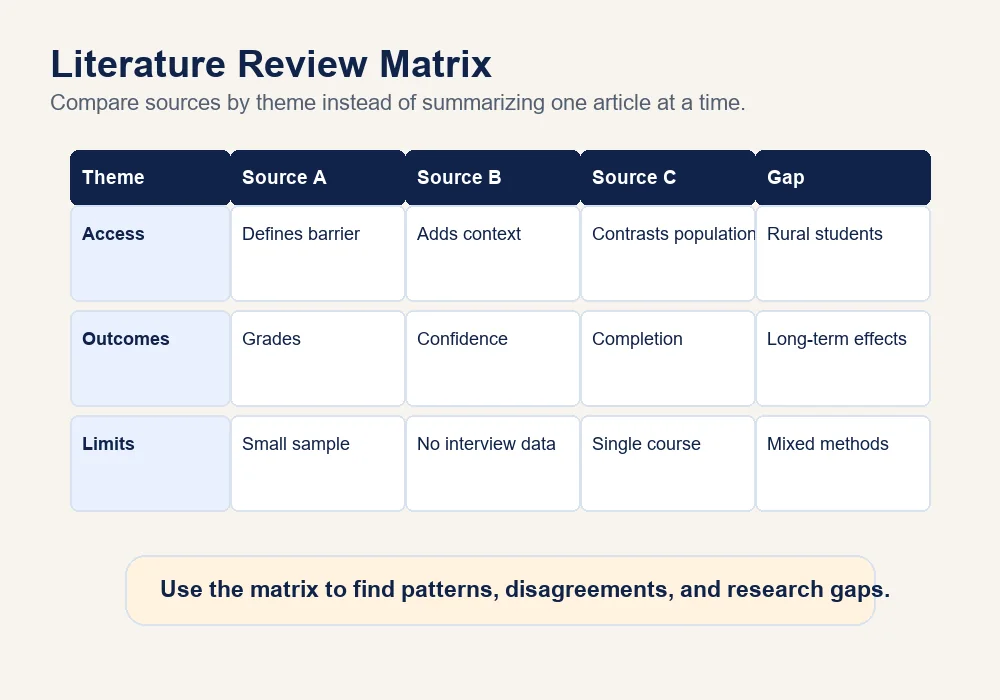
Sample matrix entry:
| Theme | Source A | Source B | Source C | Pattern | Gap |
|---|---|---|---|---|---|
| Source planning | Says students lose time when notes are not linked to sections. | Shows citation details are often missing in drafts. | Compares citation manager and spreadsheet workflows. | Early organization reduces later confusion. | Few sources explain how students maintain the system over a full semester. |
The matrix is especially useful for literature reviews, research proposals, nursing evidence summaries, social work policy papers, psychology papers, and business assignments. If you need deeper help evaluating sources, pair it with a credible-source checklist.
Mini Workflow Example: From Source to Paragraph
Here is how the system works during real drafting. Suppose you find a journal article about student deadline planning. First, save the PDF in the project folder and rename it with the author, year, and short topic. Next, add one tracker row with the citation details, source type, main argument, and the section where it might fit. Then read the article with a narrow purpose: look for evidence that helps explain why planning systems reduce missed work.
When you find a useful sentence, copy it into the quote tracker with quotation marks and a page number. In a separate note, write a paraphrase in your own words and label it as a paraphrase. Finally, connect the evidence to a paragraph plan, such as “explain why source systems save time before drafting.” By the time you start writing, you are not hunting through files. You already know the source, the evidence, the citation, and the paragraph job.
This extra step also helps you avoid weak source dumping. Instead of placing a citation at the end of a paragraph because it seems related, you can introduce the source, explain its purpose, and connect it to your own analysis.
How to Use Tags and Categories
Tags help when a source belongs to more than one idea. For example, a nursing article might be tagged:
- patient education
- discharge planning
- health literacy
- evidence-based practice
- APA citation check
Use a limited tag set. Start with broad tags such as background, method, definition, evidence, counterargument, theory, and limitations. Add subject-specific tags only when they help you retrieve sources.
Manual Versus Digital Source Organization
Manual organization works well for small projects. A folder, notebook, and spreadsheet may be enough for a five-source essay. Digital citation tools become more useful when you have many PDFs, need references, or work across several projects.
Manual systems are easier to understand. Digital systems are easier to search. Many students use a hybrid method: PDFs in folders, citations in Zotero or Mendeley, and planning notes in a spreadsheet.
Comparison of Source Organization Tools
| Tool | Best use | Strengths | Limitations | Best for |
|---|---|---|---|---|
| Zotero | Saving, organizing, and citing research sources | Free, strong browser connector, good for PDFs and citation libraries | Requires setup and citation checking | Students managing many academic sources |
| Mendeley | Citation library and PDF management | Useful PDF reading and reference management tools | Account and sync workflow may not suit everyone | Students who want a reference manager with PDF tools |
| Google Drive | Folder storage and file sharing | Simple, accessible, easy to share | Does not create citations by itself | Storing PDFs, notes, drafts, and shared files |
| Notion | Flexible research dashboard | Custom databases, tags, templates | Can become overbuilt or distracting | Students who like visual workspaces |
| Microsoft Excel | Structured source tracking | Strong tables, filters, sorting, offline use | Less convenient for citation generation | Source trackers and literature matrices |
| Google Sheets | Collaborative source tracking | Easy sharing, filters, cloud access | Formatting and large projects can get messy | Group projects and simple trackers |
The best tool is the one you will maintain. A simple spreadsheet used consistently beats a powerful tool you never update.
Sample Source Tracker
Use one row per source. Do not combine several articles into one note.
| Author | Year | Title | Source type | Main argument | Useful evidence | Citation | Paper section | Status |
|---|---|---|---|---|---|---|---|---|
| Martinez | 2021 | Patient Education and Discharge Planning | Journal article | Clear discharge education improves patient understanding. | Useful explanation of teach-back communication. | Martinez (2021) | Nursing evidence section | Use |
| APA Style | 2024 | Reference Examples | Official style guide | Reference details vary by source type. | Use to check website and journal references. | APA Style (2024) | Citation check | Reference only |
Sample Literature Review Matrix
| Theme | Martinez (2021) | Rivera (2023) | APA Style (2024) | Pattern | Gap |
|---|---|---|---|---|---|
| Source accuracy | Shows why details matter in patient education sources. | Explains planning problems when sources are separated from notes. | Provides reference-format rules. | Details should be recorded early and checked later. | Need a student-friendly workflow that combines notes and citations. |
Example Research Folder Structure
Research Paper - Patient Education
  01 Assignment Brief
    rubric.pdf
    instructor-notes.docx
  02 PDFs
    Martinez-2021-patient-education.pdf
    Rivera-2023-source-planning.pdf
  03 Notes
    source-summaries.docx
    quote-tracker.xlsx
  04 Citation Records
    apa-reference-list-draft.docx
    zotero-export.ris
  05 Draft Evidence
    outline-with-sources.docx
This structure makes the project easier to reopen after a break.
Mistakes to Avoid
| Mistake | Why it causes problems | Better approach |
|---|---|---|
Saving every file as download.pdf |
You cannot identify the source without opening it. | Rename files with author, year, and topic. |
| Highlighting without notes | You know a sentence mattered but not why. | Add a short comment beside important highlights. |
| Mixing quotes and paraphrases | You may forget what wording came from the source. | Label exact quotations, paraphrases, and your own comments separately. |
| Waiting to build citations | Details can be lost or hard to retrieve later. | Record citation fields when the source is saved. |
| Collecting too many unused sources | Drafting becomes cluttered and unfocused. | Assign each source to a paper section or mark it as skip. |
| Using tools without a workflow | Apps become storage bins instead of research systems. | Use the same capture, note, and section-link process in any tool. |
Final Source-Organization Checklist
Before drafting, confirm:
- Every source has a clear file name.
- Every source has one row in the source tracker.
- Citation details are recorded.
- Important quotations include page or paragraph locations.
- Paraphrases are labeled and cited.
- Your own comments are separate from source wording.
- Each source is assigned to a paper section.
- Unused sources are marked as skip or maybe.
- The literature review matrix shows patterns, disagreements, or gaps where needed.
- The reference list can be built from your recorded details.
Downloadable Resource
Use the StudyDoll Research Source Organizer to plan and track your sources.
Downloads:
The resource includes a source tracker, literature review matrix, quote tracker, paraphrase tracker, citation checklist, and research folder checklist.
FAQ
When should I start organizing sources?
Start as soon as you save the first source. Organization is much easier at the beginning than after you have twenty files and scattered notes.
Should I use Zotero, Mendeley, or a spreadsheet?
Use Zotero or Mendeley if you want citation-library and PDF-management features. Use a spreadsheet if you want a visible tracker for how each source supports your paper.
How many sources should I keep?
Follow the assignment requirements. Keep enough sources to support your argument, and mark weak or irrelevant sources as skip.
How do I organize sources for a literature review?
Use a literature review matrix. Put themes down the rows and sources across the columns. This helps you compare sources instead of summarizing them one by one.
What is the safest way to track quotations?
Copy exact quotations into a dedicated quote tracker, use quotation marks, and record the page or paragraph location immediately. Never mix exact source wording with your own notes without a label.
Conclusion
Source organization is a writing skill. It helps you move from a pile of materials to a paper with clear evidence, accurate citations, and stronger structure. The system is simple: create a project folder, name files consistently, keep a tracker, separate note types, and connect each source to a paper section.
Build the system early so drafting becomes less stressful. You can find the source you need, explain why it matters, and cite it correctly.
Related Resources
- How to Write a Research Paper
- How to Find Credible Sources
- Primary and Secondary Sources
- How to Create a Literature Review Matrix
- How to Write an Annotated Bibliography
- APA 7 Student Paper Format
- Academic Integrity Policy
Sources
- Zotero Documentation. The Basics.
- Mendeley Guides.
- APA Style. References.
- Purdue OWL. Writing a Research Paper.
Need Help Turning Sources Into a Clear Research Plan?
If your source list is scattered, start with the tracker in this guide before you draft. When you need a second set of eyes on your evidence plan, StudyDoll can help you organize sources, check citation details, and connect research notes to the sections of your paper.